Redesigning Joyz AI's CRM to bring conversations, calls, notes, tickets and AI activity into one workspace.
ROLE
STATUS
IMAPCT
Screens per lead reduced to
First action time reduced to
AI handoffs made visible
TEAM
1 Product Designer (me)
1 Product Manager
1 Tech lead and 3 developers
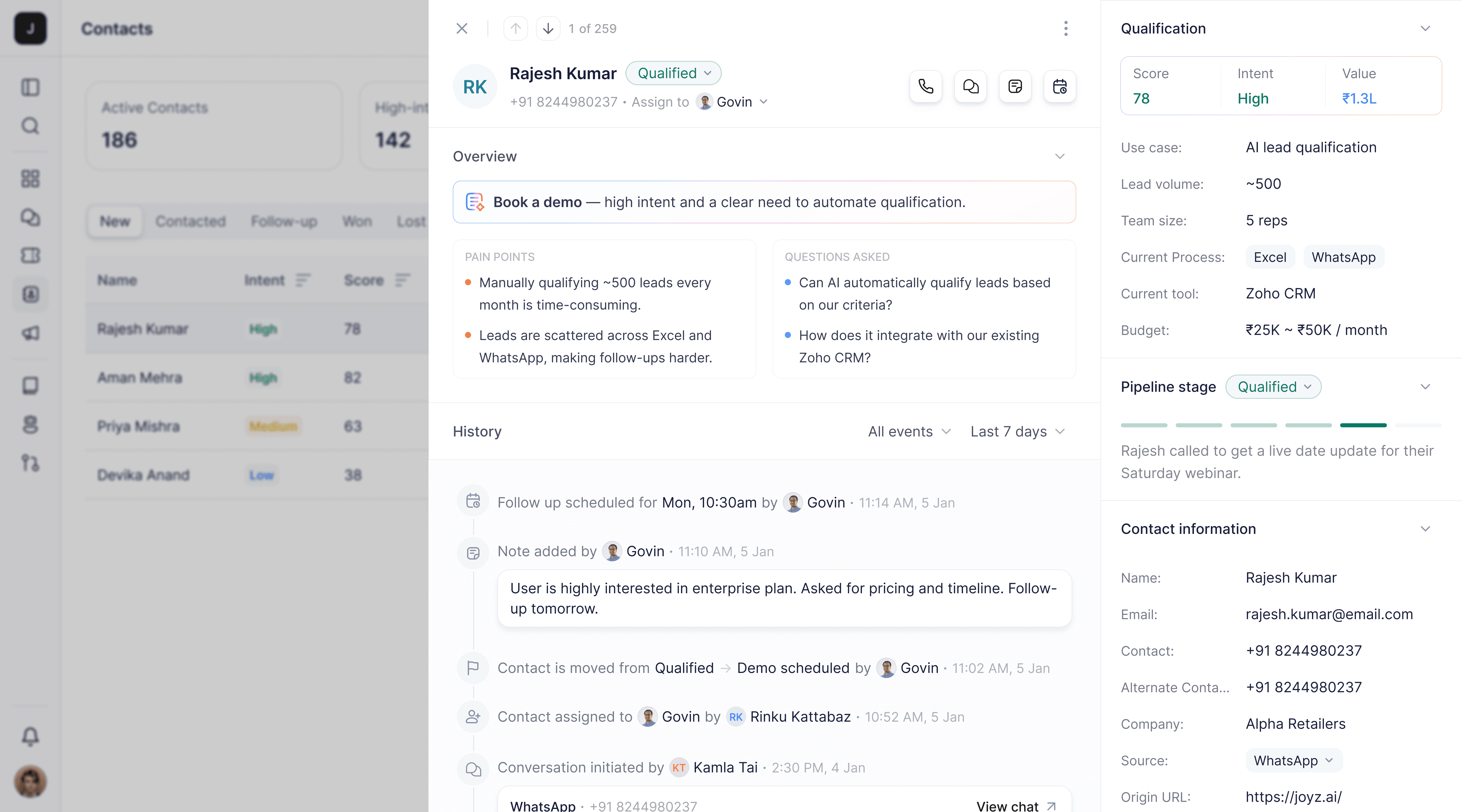
Joyz AI helps sales teams engage, qualify, and follow up with leads across WhatsApp, AI agents, and voice calls.
Every interaction creates useful customer context—what was discussed, what changed, what the customer asked for, and what should happen next. But that context was spread across conversations, notes, tickets, contact fields, and activity logs.
As the product expanded, salespeople had to move between different parts of the CRM to understand a customer before taking action.
The old CRM stored customer information across separate views, making it harder to build a complete picture before taking action.
Contact details, conversations, notes, tickets, and activity logs lived in separate areas, forcing salespeople to move between views to understand what had happened.
The CRM recorded status changes, updates, and system actions, but users had to interpret these events themselves to understand the customer's journey.
Calling, adding a note, creating a ticket, or starting a conversation often meant navigating between different parts of the CRM instead of acting directly from the customer workspace.

Conversations with sales and support teams revealed a recurring need: they wanted to understand the full customer story before deciding what to do next.
Three product questions shaped the redesign from the beginning. Some focused on usability, while others laid the foundation for Joyz AI's AI-powered sales experience.
Unify conversations, calls, notes, tickets, and AI activity into one clear, chronological customer history.
Make calling, chatting, adding notes, and creating tickets available directly within the customer workspace.
Bring AI conversations and actions into the same timeline so sales teams can quickly see what happened and take over.
The redesign wasn't about adding more CRM features. It was about changing how salespeople understand, navigate, and act on customer context.
01
One customer. One timeline.
I brought calls, notes, AI activity, and tickets into one timeline, so sales teams can understand the customer without jumping between views.
02
Put actions where decisions happen.
I placed Call, Chat, Note, and Ticket within the customer workspace, so users can act without losing context.
03
Make AI activity part of the customer story.
I added AI conversations and actions to the same history, so sales teams can see what AI has already handled.
04
Keep the customer visible while exploring.
I kept contacts, customer history, and details within one workspace, making it easier to move through the CRM without losing context.
The redesigned CRM experience guides sales reps through the complete journey of managing a qualified lead. From AI qualification and sales handoff to understanding the lead, taking action, scheduling follow-ups, and tracking activity, each step keeps the customer context connected.

I brought customer information, sales actions, AI insights, and activity history into a single workspace.
The decision: Put the lead at the centre so salespeople can understand and act without losing context.

Reps can start calls through the Joyz app, see the live status, add notes during the conversation, and keep the recording attached to the lead.
The decision: Capture the conversation and its context together, so nothing important is lost after the call.
Reps can talk to customers directly from the lead while keeping their details and history available.
The decision: Keep the conversation in the same workspace as the customer information.
Reps can quickly add important details, customer preferences, or next steps and save them directly to the timeline.
The decision: Make capturing context lightweight enough to happen during the work, not after it.
Reps can set a reminder for the next action with a lead, including when it should happen and what needs to be done.
The decision: Turn “I’ll follow up” into a clear action the CRM can remember.
AI learns from every customer touchpoint and surfaces the key signals and a suggested next action, so reps can decide what to do without reading through every past conversation.
The timeline brings the entire lead journey into one place, from AI conversations and sales calls to notes, follow-ups, and updates. Reps can quickly understand what happened without checking multiple sections.
How the new experience changed the way sales teams worked.
5→1
Views collapsed into one
Reduced lead research from 5 screens to one unified workspace.
35 sec
Faster first action
Average time for a rep to understand a lead's full history before acting.
80%
AI handoffs made visible
Made AI actions visible, helping reps understand lead context before taking over.
This project changed how I think about connecting AI insights, customer context, and sales actions.
01
AI qualification is only valuable when sales reps can act on it.
02
Every interaction with customer should make the next one easier.
03
Keeping actions with context makes sales workflows faster.
04
Edge cases deserve the same attention as the happy path.